Switching event agency software: how do you avoid swapping one rigid tool for another?
You bought software to get away from spreadsheets. Then a client changed the scope after sign-off and you couldn't edit the line. Or the budget wouldn't let you rename a heading. Or the quote that went to the client looked nothing like your agency.
So the team quietly went back to Excel. Every budget takes longer, but at least it's yours.
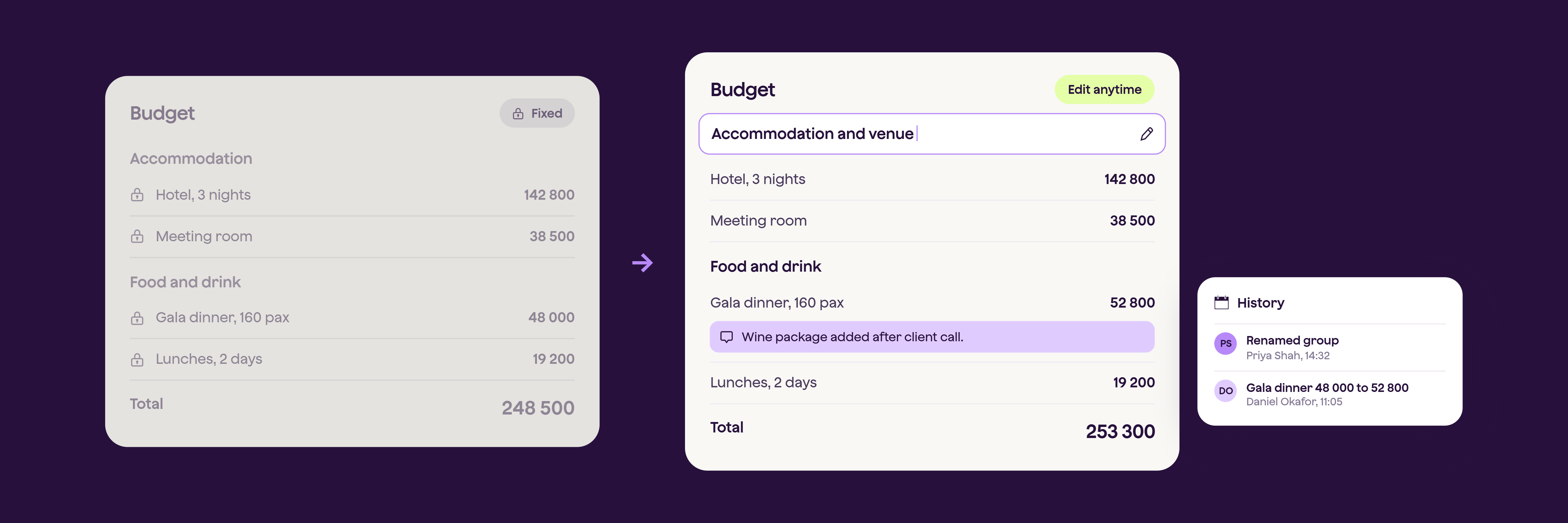
We hear versions of this from agencies all the time, and it's why so many put off a switch even when they know their spreadsheets are holding them back. This guide covers how to spot a rigid platform before you sign, what switching really involves, and how to roll it out without stalling your team.
Quick answer: To avoid swapping one rigid tool for another, test a platform on your messiest recent project before you sign. Check that you can edit confirmed budgets with a full history, restructure lines and headings yourself, own your templates, control how client documents look, and give each person the right level of access. Then plan the switch for a quiet period and agree a clear onboarding plan with the vendor.
Why do agencies go back to spreadsheets after buying software?
Spreadsheets are rarely the better tool. The software took away control the team needed to do the job, so they went back to what they could bend.
The same four complaints come up again and again:
-
Changes are painful. Fixing a confirmed budget means a workaround or a correction entry for every small amendment.
-
The structure is fixed. You can't rename a heading, add a section or reorder lines to match how you actually cost an event.
-
Client documents look generic. The quote that reaches the client looks like the software vendor's, not yours.
-
Every change needs the vendor. Editing a template turns into a support ticket.
Events move fast. Scope changes late, supplier prices shift and costs turn up weeks after the client price was agreed. A tool that can't flex gets worked around, and the workaround is almost always a spreadsheet.
Spreadsheets do give you control. They also give you broken formulas, copy and paste between tools, several versions of the same budget and margin you only see once the event is over. If that sounds familiar, our guide on replacing spreadsheets for planning and execution goes deeper.
How can you tell if a platform is too rigid before you sign?
Test it on real work. Don't rely on the demo script. Here's a checklist you can use with any vendor:
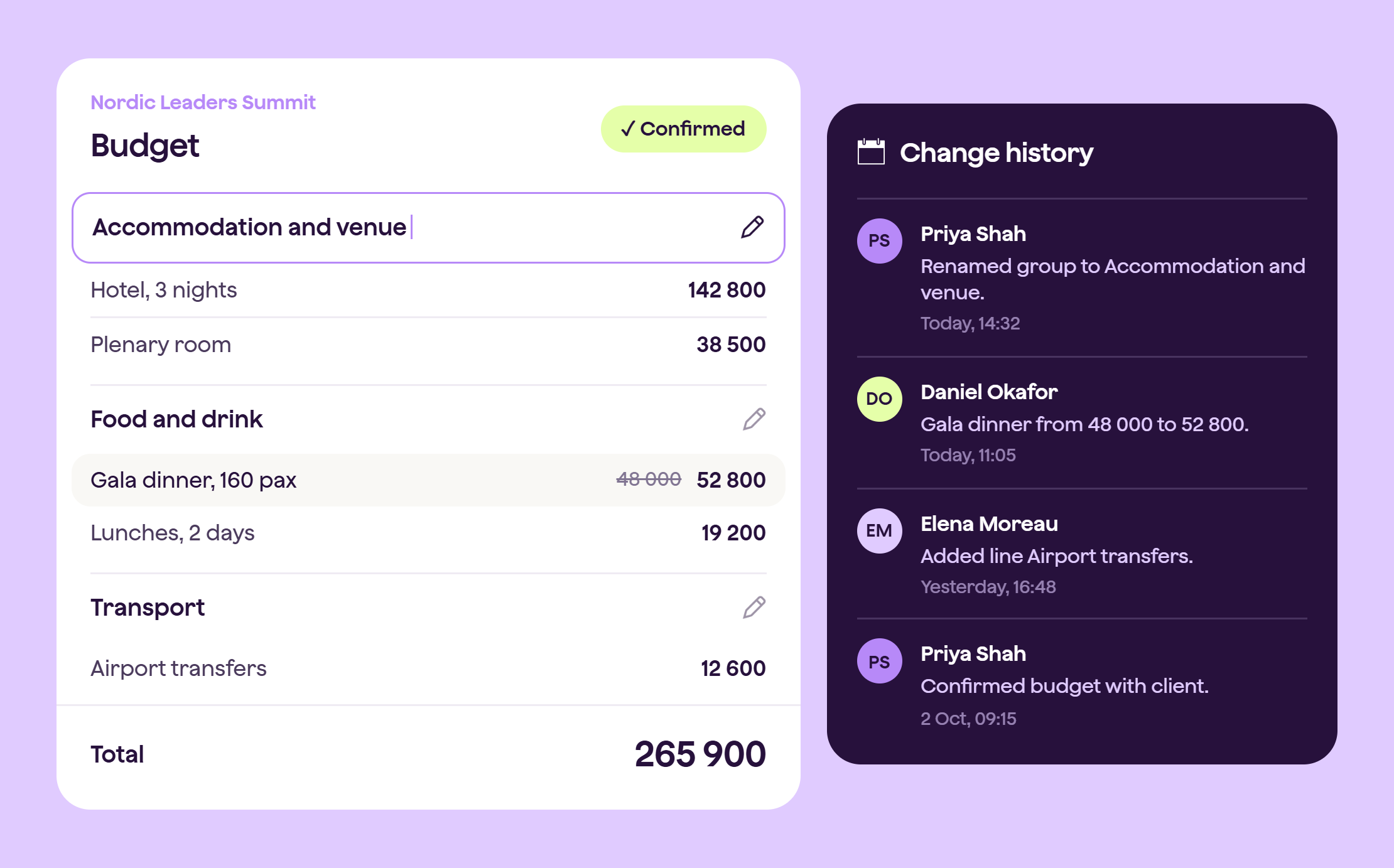
- Change a confirmed budget. Good: you can edit it, and the history shows who changed what and when. Red flag: it's locked, or every change needs a reversal entry.
- Restructure the budget. Good: you can rename groups and headings, add lines and drag them into a new order. Red flag: fixed categories you can't touch.
- Add context for the client. Good: you can put a note on a line to explain why it costs more. Red flag: no free text on lines.
- Own your templates. Good: your admins edit templates themselves. Red flag: every template change goes through the vendor.
- Control client documents. Good: your logo and colours, as a digital proposal or a classic PDF or Excel. Red flag: one fixed look for everyone.
- Keep a cost private. Good: a line can sit in the budget without showing on the client offer. Red flag: everything is visible, or nothing is.
- Correct mistakes. Good: you can amend entries, within your own approval rules, with an audit trail. Red flag: entries can never be amended.
One caution. Flexible doesn't mean loose. Some agencies want extra approval steps and locked fields on top of this, especially larger ones. The right platform lets you choose how much structure to apply, so you stay in control without tying your producers' hands.
How do you keep control of how client documents look?
Agencies sell on taste. What the client sees has to look like your work.
Ask three things:
-
Can you send a branded digital proposal in your own logo and colours?
-
Can you also output a classic PDF or Excel version if a client expects one?
-
Can you see when the client opened it and what they accepted?
In Qondor, the client quote can be a visual digital proposal in your brand, or a more traditional downloadable version. The history shows what was sent, when the client last viewed it and when they confirmed, with the confirmation branded in your look.
Changes show up fast too. Add a line to the budget, save, and it's live on the offer. If a cost should stay internal, you can unpublish the line from the client offer and keep it in the budget.
What does switching actually involve, step by step?
Less than most teams fear, if you break it into stages:
-
Map what you do today. List where budgets, quotes, time, invoices and reports live. Decide which tools the new platform replaces and which you keep, such as a CRM.
-
Choose a pilot. Pick one live project and one project type to start with.
-
Set up your templates. Build your structure, terms, markups and branding once. With Qondor we help set templates up from the start. You own them and can change them any time.
-
Connect your accounting. In Qondor, invoices and credit notes go from the budget to your accounting system, Xero for example, and payment status comes back into the project.
-
Decide what happens to old projects. Most agencies don't move everything. They start new enquiries in the new platform and let live projects finish where they are.
-
Train in small groups. Run the pilot with the people who will use it daily, then roll out to the rest.
-
Cut over. New projects start in the new platform from a set date.
How long does it take?
Agencies replacing their core proposal, budget and reporting tools commonly report being operational within about two weeks. This depends on how many tools you're replacing and how many templates you need, so ask any vendor for a specific number and what they do in week one.
When's the best time for an agency to switch platforms?
Pick a quiet stretch, not the middle of your busiest season. Many agencies aim for the start of a new quarter or year, because it gives finance a clean line and gives the team time to learn the platform before the next peak.
Remember to leave room for training. A switch rushed into a live event week is how teams end up back in spreadsheets.
Who in your team needs access to an event management platform, and to what?
Not everyone needs everything. Producers need budgets and quotes. Finance needs invoicing and reconciliation. Freelancers and temporary staff often need far less.
Check that the platform lets you set access by role, so you can share what people need and keep the rest private. In Qondor, the Limited project manager role is built for exactly this. Read our guide on hiring temporary staff and managing their access to data.
How do you test an event management platform on a real project before committing?
Make the vendor work on your terms:
-
Pick your messiest recent project, the one with late changes and a few surprises.
-
Share the budget structure and ask for a tailored demo built on it.
-
Ask them to make three changes live, including one after confirmation.
-
Look at the client document. Would you send it?
-
Ask what finance sees, and how it reaches your accounting system.
-
Ask who sets up templates, what happens in week one and who you call when something breaks.
Our list of 10 questions to ask before choosing event agency software covers even more.
Where does Qondor fit?
Qondor is built for agencies and TMCs that want one connected flow from enquiry to invoice. Proposals, budgets, time tracking and invoicing sit in one place, with the flexibility to change things as the project changes and a history that shows what happened. KRS LIVE saved more than 675 hours after switching.
Not sure if it is flexible enough for your kind of events? Read our FAQ "Is Qondor flexible enough for my type of event?" or book a demo and bring your messiest project.